The SoundStation IP 5000 settings are in my opinion way too complicated, and if you’re sitting in front of it for the first time you’ll probably just have question marks above your head. On top of that, the incredibly slow speed, especially when rebooting…
That said, connecting the SoundStation IP 5000 to a FritzBox is actually quite simple. I personally prefer using the web interface, since operating the device itself is very tedious.
FritzBox configuration
Let’s start with the FritzBox settings:
- Log into the FritzBox web interface
- Add the desired phone numbers
- Add a new telephony device on the LAN/WLAN port – note down the username and password!
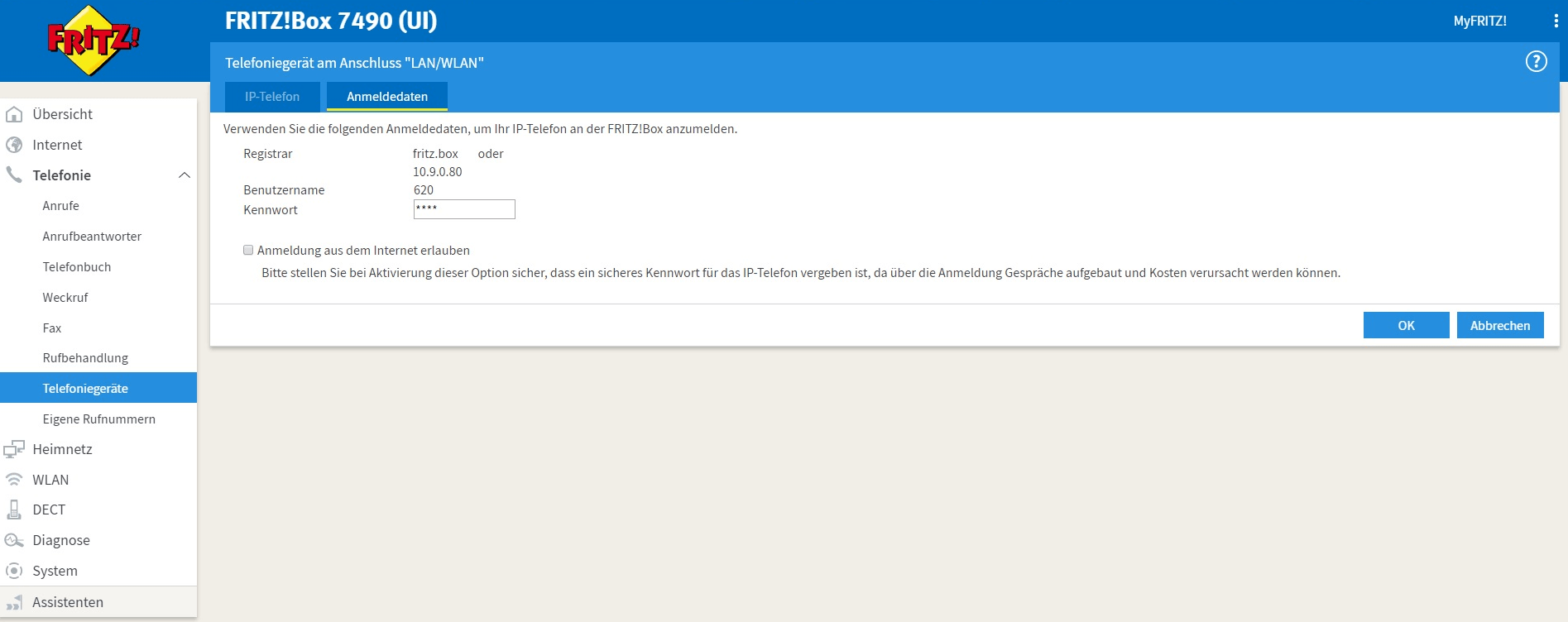
(FritzBox telephony device)
SoundStation configuration
Next, open the SoundStation web interface and navigate to the Lines tab.
Under Identification, enter the following:
- Address:
620(the username from the FritzBox telephony device) - Authentication User ID:
620(again the username from the FritzBox telephony device) - Authentication Password: (the password from the FritzBox telephony device)
Display Name and Label can be set to whatever you like – these will be shown on the SoundStation’s display.
Further down, under Server 1, enter the FritzBox connection details:
- Address:
fritz.box(or the IP address) - Port:
0(yes, just leave it at 0 – it works!) - Transport:
DNSnaptr
The remaining settings can stay as they are.
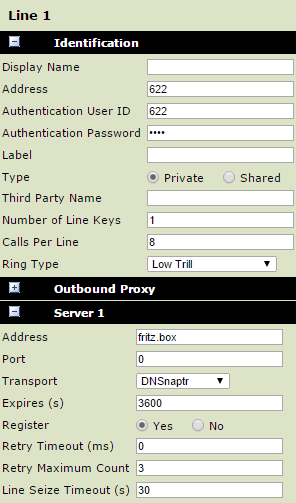
(SoundStation configuration example)
Now save and the SoundStation should work through the FritzBox!
A restart of the SoundStation may be necessary.