Two machines in this house had been freezing under Wayland, and BAR1 pressure was on the list of suspects for both. Checking the aperture takes one command:
nvidia-smi -q | grep -A4 -i "BAR1 Memory"
    BAR1 Memory Usage
        Total                                          : 256 MiB
        Used                                           : 29 MiB
        Free                                           : 227 MiB
256 MiB is the legacy PCI aperture, and it is what you get when Resizable BAR is not in play. On every card here, once it was working, the aperture ended up large enough to cover the whole framebuffer, so the feature was off on an RTX 3080, and, as it turned out, on an RTX 3070 in the other machine too. A third machine in the house was sitting at 256 MiB as well, and it is the one that ended up changing what I thought I had learned from the first two.
Getting there involved two near-miss VBIOS files, a kernel parameter concerned with /dev/mem rather than graphics, and, on the second machine, a BIOS option I had already ruled out because it was set correctly on the first one.
The short version: four things have to be right. The CPU and chipset have to support it, the platform has to expose usable 64-bit address space above 4 GB, the card has to advertise a larger size, and something has to actually perform the resize. I started this with the first three, because on two machines the fourth happens by itself. On the third it did not, and that is the part worth reading.
Who performs it is the interesting bit. Board firmware can do it at boot, and where it does, the NVIDIA driver simply inherits a window that is already the right size. Where it does not, the driver has to ask, and it will not ask unless NVreg_EnableResizableBar tells it to. That parameter is the one a Linux tweak collection recommends setting. It is not the fourth link; it is one of two ways to satisfy it.
All three machines are mine. The first two are AMD, and I had been staring at each of them for weeks before I started measuring, which is a thin base for a procedure meant to work on hardware I have never seen. The third is the one place in this post where the checks were run cold: an Intel platform, a card from a third board partner, and a fault I had not already formed an opinion about. It is also where the tidy conclusion I had written fell over.
Start here: which link is broken
If you arrived at this page with BAR1 Total: 256 MiB and no interest in the story, these checks will tell you which section you actually need. Run them in order. Each one assumes the ones above it came back clean.
GPU_SLOT=0c:00.0                                       # yours will differ: lspci | grep -i vga
sudo lspci -vvs "$GPU_SLOT" | grep -A4 -i "Resizable BAR"  # what the card offers
nvidia-smi -q | grep -A2 -i "BAR1 Memory"              # what is actually active
journalctl -k -b | grep "root bus resource"            # where the board can put it
grep EnableResizableBar /proc/driver/nvidia/params     # what the loaded driver is using
The last one reads the value the loaded driver is actually using, which is not the same as what you configured. modinfo nvidia | grep -i bar only shows that the module accepts NVreg_EnableResizableBar, and grep -rs ResizableBar /etc/modprobe.d/ only shows what you intended. I first looked under /sys/module/nvidia/parameters/, found no entry, and concluded the value was not exposed; the parameters are registered without read permission, so nothing appears there. NVIDIA publishes it under /proc instead:
EnableResizableBar: 0
All three machines here now run a full-size aperture with that reading 0, so it is information rather than something to fix on sight. On the first two, 0 was what their final working configuration wanted. On the third, once the card-side ceiling was gone, it was the whole problem until a board setting changed. Which of those you are looking at is the third row of the table below.
| What you see | Broken link | Seen here on | Section |
|---|---|---|---|
No output at all, or supported: stops at 256MB | The card’s firmware, and the board has nothing to act on | all three cards | Machine 1: find and verify the right VBIOS, or establish that none exists |
Large sizes offered, BAR1 still 256 MiB, no root bus resource window reaches past 0xffffffff | No usable root-bus window above 4 GiB. Check Above 4G Decoding and CSM. Re-Size BAR Support sits in the same menu but belongs to the row below, not this one | RTX 3070’s board | Machine 2 |
| Card offers large sizes, platform has a window above 4 GB, BAR1 still 256 MiB | No resize is active, or one was attempted and failed. Here it was the board firmware leaving the job to a driver that will not ask by default. Try Re-Size BAR Support set to Enabled, or NVreg_EnableResizableBar=1; if the aperture still does not move after that, the resize is failing on address space or another platform blocker rather than on nobody asking | RTX 3090 | Machine 3 |
nvflash fails with mmap(): /dev/mem | Driver still bound, strict /dev/mem, or kernel lockdown | all three | Getting nvflash to run on Linux |
If that first row gives you no output at all, do not conclude anything yet.
That is what happened to me, and it was wrong: the capability was there and the
grep simply did not find it. Read the whole lspci -vv block for the device
before deciding, and cross-check with
cat /sys/bus/pci/devices/<addr>/resource1_resize, which prints a bitmask if
the capability exists and does not exist as a file if it genuinely does not.
Two ways of asking the same question, and they disagree only when one of them
was asked badly.
That first row has a floor under it. A card can only offer a larger aperture if its own vendor published firmware that offers one for the exact board you physically own. For plenty of cards no such file exists. NVIDIA’s own GeForce firmware programme for this starts at the RTX 30 series,1 and nothing on this page establishes an upgrade path for anything older. If you cannot find one from the board partner for your model, that is the answer, and nothing further down this page changes it. Firmware from a different model is not a way around that.
CPU and chipset support is the awkward one that these checks cannot settle. Vendor support tables are one starting point, but as the 3950X below shows, they do not necessarily describe every combination that works. If everything above comes back clean and the aperture is still 256 MiB, the platform is where to look next, with the caveat that you are then outside what anyone has committed to supporting.
The rest of this post is how I found each of those the hard way, on two machines that failed differently, and what the same two commands said about a third.
Where the block actually is
The PCI capability tells you what the card is willing to offer:
sudo lspci -vvs 05:00.0 | grep -A6 -i "Resizable BAR"
This is the 3070’s answer, which is the one I kept:
        Capabilities: [bb0 v1] Physical Resizable BAR
                BAR 0: current size: 16MB, supported: 16MB
                BAR 1: current size: 256MB, supported: 64MB 128MB 256MB
                BAR 3: current size: 32MB, supported: 32MB
That supported: list is the ceiling. It stopped at 256 MB, so no BIOS setting, kernel parameter or driver option could have produced a larger aperture. The capability is there; the card simply does not offer a size worth having. After their Resizable BAR VBIOS updates, all three listed sizes up to one that covers their framebuffer.
The other two cards were in the same position, and I am less able to prove it than I would like. I did not keep the 3080’s printout, and the note I made at the time is wrong in a way worth admitting: I wrote down that the card had no Resizable BAR capability at all, because a grep came back empty. That was a conclusion drawn from a blank terminal, and it survived into an earlier draft of this post as a contrast between two kinds of card that never existed. The 3090 I read through sysfs rather than lspci, which is the same information in a less readable form.
That reframes something I had spent a while staring at in the board firmware. The Re-Size BAR Support item on the X570 offers only Auto and Disabled, with no Enabled to pick, and I had read the missing option as the board lacking the feature. It is not: this board simply has no Enabled choice, before or after, and Auto is the whole mechanism. What was missing was not the switch but a size above 256 MB for it to select.
The RTX 3090 in the third machine, on an Intel platform and from a third board partner, reported the same ceiling before its own update, in the sysfs form below.
The same information is in sysfs as a bitmask, which turns out to be the more useful form later:
cat /sys/bus/pci/devices/0000:05:00.0/resource1_resize
Bit n means 2ⁿ MB is available, so bit 6 is 64 MB, bit 13 is 8 GB. A value of 0x1c0 is bits 6–8: 64, 128 and 256 MB, and nothing else. 0x1c0 is what the 3070 and the 3090 reported before their updates, measured. The 3080 was stuck at the same 256 MiB aperture and I am confident it read the same, but that one is memory and inference rather than a saved reading.
Laid out side by side, the whole diagnosis is one picture:
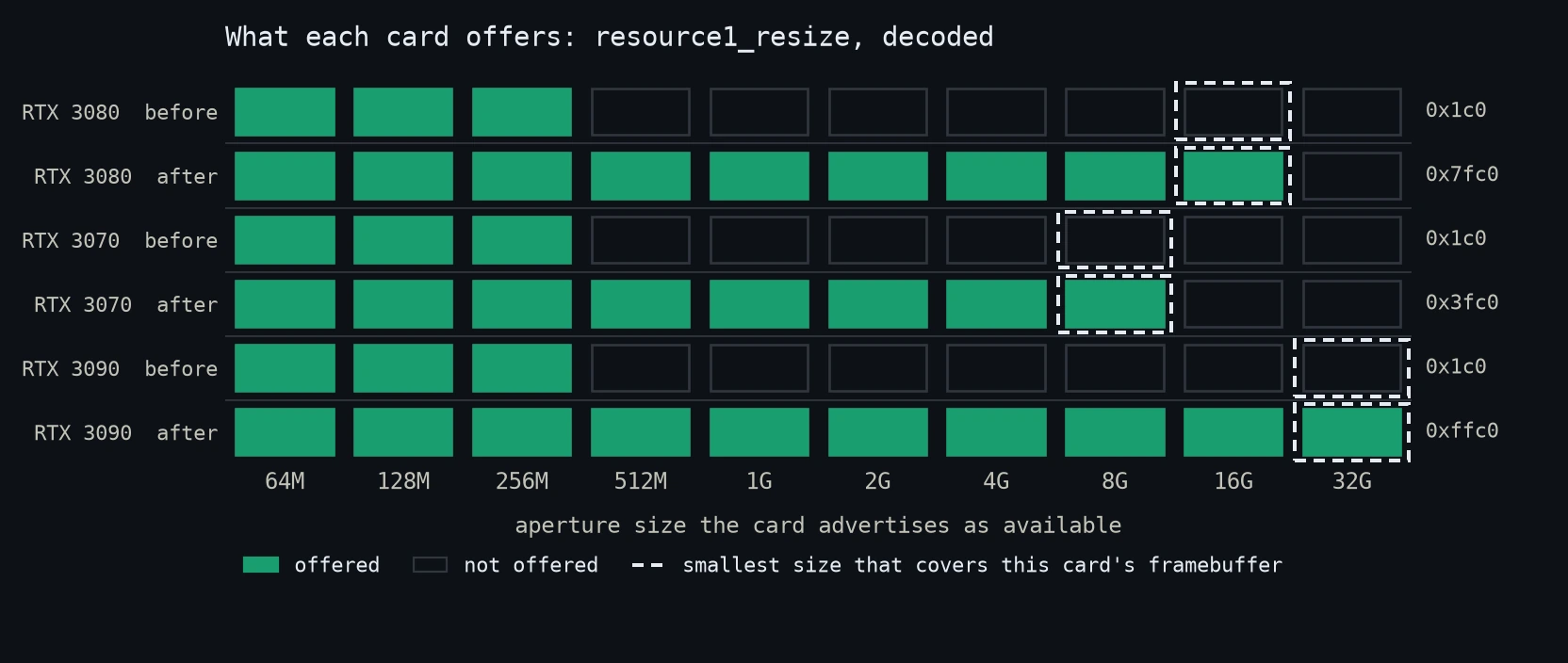
The resource1_resize bitmask, decoded. All three cards start in the same place and each ends at the smallest power of two that covers its framebuffer. The dashed outline marks that size, which is arithmetic from the VRAM figure rather than a measurement. The 3080-after row and both 3090 rows were read off the running machines. The two 3070 values come from my notes. The 3080-before row is the weakest of the six: its mask was never recorded, and it sits here on the aperture the card was stuck at plus the identical readings of the other two.
The driver parameter that made no difference here
The nvidia-tweaks collection suggests checking the Resizable Bar column in nvidia-settings first and then setting a module parameter, NVreg_EnableResizableBar=1.2 The module does accept it:
modinfo nvidia | grep -i bar
parm: NVreg_EnableResizableBar:int
Nothing in /etc/modprobe.d/ was setting it, so it sat at its default. Setting it is one file:
echo 'options nvidia NVreg_EnableResizableBar=1' | sudo tee /etc/modprobe.d/nvidia-rebar.conf
On this CachyOS installation with Limine, mkinitcpio -P reported that there were no presets in /etc/mkinitcpio.d and offered to run limine-mkinitcpio instead. I said yes. I assumed at the time that the rebuild was not strictly required, on the grounds that MODULES=() in mkinitcpio.conf meant the NVIDIA modules would load from the real root, where /etc/modprobe.d/ is read normally. That reasoning is wrong: MODULES=() only says nothing extra was listed there by hand, and hooks can still pull modules and /etc/modprobe.d/ into the image regardless. The third machine later proved the point, where the same file did nothing until the initramfs was rebuilt. Rebuild it, and check the hooks rather than trusting MODULES=() to tell you anything.
After a reboot: still 256 MiB, because of the firmware ceiling described above. That much was expected. What is easy to carry forward from there is the assumption that the parameter becomes necessary once the ceiling is gone, and that one is worth testing rather than inheriting.
Once everything else was working I went back and tested it properly, by setting the parameter to 0 and rebooting with the new firmware and Above 4G Decoding both in place:
EnableResizableBar: 0

    BAR1 Memory Usage
        Total                                          : 16384 MiB

        BAR 1: current size: 16GB, supported: 64MB 128MB 256MB 512MB 1GB 2GB 4GB 8GB 16GB
A full 16 GB aperture with the parameter off. The second machine says the same from the other direction. No such file was ever created there, so the driver ran at its default throughout, and reading the same interface on that machine confirms it:
EnableResizableBar: 0
It reached its full 8 GB aperture regardless.
The obvious explanation is that the platform firmware assigns the window at boot, once Above 4G Decoding and Re-Size BAR Support are enabled. The driver then finds the window already configured and uses it, which would leave the parameter relevant only where the driver has to request the resize itself.
When I first wrote this section I called that a guess and left it there, because I had no machine to test it on. Then the third one turned up, did exactly what the guess predicted, and I got to keep the explanation and lose the conclusion. That measurement is further down; read it before you take the paragraphs above as advice.
What holds for these two machines is narrower than “it does nothing”: with correct firmware and correct BIOS settings, a reading of 0 coincided with a full-size aperture, and on the 3080, booting deliberately with 0, the configured aperture stayed at 16 GiB and BAR1 usage remained above 1 GiB. I did not compare performance, stability or any other driver path. I removed the file on that machine because it changed nothing there, which turns out to be a statement about that machine rather than about the parameter.
The one thing that did not explain the 256 MB ceiling
The CPU generation. The official documentation answers a narrower question than it first appears to. NVIDIA’s support matrix lists only Zen 3 on the AMD side, spelled out as Ryzen 3/5/7/9 5xxx, and ASUS repeats it on the download page as “Intel 10th Gen or AMD Zen 3 CPU”.1 3 Read either one and you would conclude that a Ryzen 9 3950X cannot do Resizable BAR at all, and stop there.
It runs a 16 GB aperture on an ASUS ROG Strix X570-E Gaming, BIOS 5031. The board is the component doing the work here, and the explanation is in NVIDIA’s own note further down the same page: “some motherboard manufacturers have unofficially extended Resizable BAR support to prior generation products. Your mileage may vary utilizing these solutions.”1
So those tables are official-support lists, not statements about what the silicon can do. Worth knowing before you write off your platform on the strength of one. But equally, do not assume yours will work just because mine did. The vendor is not promising that combination is supported.
Two terms get used interchangeably here and are worth separating while searching: Smart Access Memory is AMD’s branding for the feature in an all-AMD system, while Resizable BAR is the vendor-neutral PCIe capability underneath it. An AMD CPU driving an NVIDIA GPU is using the latter, so AMD’s SAM pages, which assume a Radeon on the other end, describe a different combination than the one in front of you.
Machine 1: the card was not the card
Before hunting for firmware you need to know what you are holding, and on this machine that is not what the tools tell you:
lspci -nn -s 0c:00.0
0c:00.0 VGA compatible controller [0300]: NVIDIA Corporation GA102 [GeForce RTX 3080] [10de:2206] (rev a1)
	Subsystem: ASUSTeK Computer Inc. Device 87ac
Subsystem 1043:87AC is an ASUS ROG Strix, and the reported 370 W power target agrees with the Strix OC firmware entry. Every reading points at an ASUS card.
The card in the slot is an MSI RTX 3080 Gaming X Trio, board number 602-V389. I cross-flashed the ASUS Strix firmware onto it years ago for the higher power limit, so I knew that going in. Someone reading these numbers off an unfamiliar machine would not: lspci and nvidia-smi report what the firmware claims, not what the PCB is, and they do it consistently enough that nothing else on the system contradicts them. The only thing that settles it is the sticker on the card.
The reason for that original cross-flash is visible in the numbers. Both firmwares target the same GA102 die:4
| MSI Gaming X Trio (stock) | ASUS Strix OC (flashed) | |
|---|---|---|
| Power target | 340 W | 370 W |
| Power limit | 350 W | 450 W |
| Adjustment range | −71% / +3% | −73% / +22% |
| Boost clock | 1815 MHz | 1905 MHz |
The MSI firmware is effectively nailed shut at +3%. Whichever firmware you move to, check you are not giving up headroom you rely on.
Picking the right file, and two ways to get it wrong
There is a real ASUS package for this, and it is still online. For this card it is on the ROG Strix RTX 3080 10G Gaming download page (rog.asus.com) under NVIDIA Resizable BAR on systems with an ASUS GeForce RTX 30 series graphics card, currently at version V6.3 The pointer that got me there was an r/nvidia thread from March 2021 (www.reddit.com). Worth knowing, because ASUS files these under a heading that does not contain the word “VBIOS” anywhere, and the download section is easy to walk straight past.
The file is called RTX3080_V6.exe, and despite the extension it is a plain archive containing twenty .rom files, a Windows flasher, and, the useful part, a mapping table.
Wrong file 1: a different SKU. An RTX 3080 Ti VBIOS is not a “newer” RTX 3080 VBIOS. Different die (GA102-225 vs GA102-200), different device ID (0x2208 vs 0x2206), different memory bus (384-bit vs 320-bit), different capacity. NVIDIA states this plainly: do not install Founders Edition or other custom firmware, it is not compatible.1
Wrong file 2: the right model, wrong board revision. The newest ASUS Strix OC entry in the TechPowerUp database is 94.02.71.40.9A, dated May 2021, comfortably after the Resizable BAR rollout, and the table row carries no warning label. Its detail page does:
GPU Device Id: 0x10DE 0x2216
Subsystem Id:  1043 882E
"ASUS ROG STRIX RTX 3080 V2 GAMING OC"
Device 0x2216 is the V2/LHR board revision. Mine is 0x2206. Same model name, same manufacturer, incompatible firmware. The listing directly beneath it is labelled LHR and differs by a single hex digit (9B vs 9A), which is an unpleasant way to lose a graphics card.
The way to stop guessing is TechPowerUp’s device-ID filter, which takes the full vendor:device:subvendor:subdevice tuple:
https://www.techpowerup.com/vgabios/?did=10DE-2206-1043-87AC
That returns firmware matching that PCI identity and nothing else.
With one important qualification, which my own machine is the counterexample to: the filter matches the identity the card reports, and on a cross-flashed card that is the identity of the firmware already on it, not of the PCB underneath. Searching 1043:87AC returned ASUS Strix firmware, correct for what the card claims to be and still not firmware written for the MSI board it is physically running on. If your card has ever been cross-flashed, the ID filter narrows the field but does not tell you the result is electrically right for your hardware. The PCI identity reported by userspace cannot reliably tell you which physical PCB is underneath a previously cross-flashed card. For that you are down to the sticker on the board.
The right file came from the ASUS package itself. BIOS_Compare.ini maps every known starting version to its update target:
[94.02.26.48.AS01]
OldVersion = 94.02.26.48.AS01
NewVersion = 94.02.42.00.AS61
PQMode_Num = 1
To find your starting version, read the strings out of the firmware on the card rather than trusting the marketing version number:
strings -n 6 vbios-dump.rom | grep -iE "VB Ver|ROG-STRIX"
RTX3080 VB Ver 94.02.26.48.AS01
ROG-STRIX-RTX3080
AS01, exactly the key in ASUS’s table. Target: 94.02.42.00.AS61.rom. Verify it before writing it anywhere:
python3 - 94.02.42.00.AS61.rom <<'EOF'
import sys, struct
d = open(sys.argv[1], 'rb').read()
i = d.find(b'PCIR')
if i == -1:
    raise SystemExit("PCIR structure not found")
ven, dev = struct.unpack_from('<HH', d, i + 4)
print(f"Vendor 0x{ven:04X}  Device 0x{dev:04X}")
EOF
Vendor 0x10DE Device 0x2206
strings -n 6 94.02.42.00.AS61.rom | grep -iE "VB Ver|ROG-STRIX|94\.02"
VRTX3080 VB Ver 94.02.42.00.AS61
ROG-STRIX-RTX3080
Version 94.02.42.00.D6
Device ID matches and the internal version matches the table’s target. That is as far as these two commands get you. The full subsystem comparison comes from nvflash itself, which prints both IDs side by side before it writes anything, and is shown further down.
Note that AS61 is externally version D6, the same 94.02.42.00.D6 that TechPowerUp lists with a build date of November 2020. I had written that version off as pre-Resizable-BAR based on the date. The date is misleading; ASUS ships this exact version as the Resizable BAR update.
Before the first command: know your way back
A graphics card has no BIOS Flashback button. If a write fails on the only card in the machine, you can lose local display output entirely, and there is no keystroke that undoes it.
Settle all of this before running anything below:
- A way back in. A dual-BIOS switch, a second PCIe card physically in the room, an iGPU, or working remote access to a machine that still boots. Neither of the first two cards had a dual-BIOS switch and neither of those two CPUs had integrated graphics, so the plan was the other machine’s card, one screwdriver away. The third machine did have a working iGPU, and still needed a cable moved before it was any use: see below.
- A backup you have read.
nvflash --save, copied off the machine, and opened to check it is not zero bytes.- The right file. For the exact board you physically own. A matching PCI device ID is not proof of that, and on a card that has already been cross-flashed it proves even less, because the ID reflects the firmware currently on it rather than the hardware underneath.
- Stable power. Not during a thunderstorm, not on a machine you might trip over.
If anything unexpected appears, a device ID that does not match, a board name you did not expect, an image whose size looks wrong, stop rather than reaching for a force flag. The detailed caveats at the end of this post are worth reading before you start, not after.
Getting nvflash to run on Linux
Jumped straight here from the table? Read Before the first command first.
The ASUS package only contains a Windows flasher. On Linux you want nvflash, which lives in the AUR rather than the repositories. CachyOS ships paru in its own repository, so on a fresh machine that is two commands:
sudo pacman -S paru
paru -S nvflash
Worth reading the PKGBUILD when it offers, because this one is unusual: it does not ship the binary, it downloads the archive straight from TechPowerUp through a custom DLAGENTS entry and checks it against a recorded sha256sum. The package itself is then just install -Dm755 of the extracted binary. Version 5.867-4 at the time of writing, license=('unknown'), which tells you roughly what you are dealing with. The checksum is the part that matters: it is the only thing standing between you and whatever that URL serves.
First attempt:
sudo nvflash --save ~/vbios-backup.rom
NVIDIA Firmware Update Utility (Version 5.867.0)
Copyright (C) 1993-2024, NVIDIA Corporation. All rights reserved.

Device:00:0C:00:00=10DE:2206:1043:87AC GPU
ERROR: mmap(): /dev/mem[ Base addrres = 0xfa000000, size = 0x01000000]
Attempt to map physical memory failed.
The card is detected; the memory mapping is refused. Both of these were true on these systems: strict /dev/mem checking was enabled in the kernel, and a driver owned the range being asked for. I did not test them separately, so I cannot tell you which one alone would have been enough to block it. The one-time boot below clears both, which is all I needed.
First, the checking:
zgrep -E "CONFIG_STRICT_DEVMEM|CONFIG_IO_STRICT_DEVMEM" /proc/config.gz
CONFIG_STRICT_DEVMEM=y
CONFIG_IO_STRICT_DEVMEM=y
IO_STRICT_DEVMEM is the stricter of the two and refuses MMIO regions a driver has claimed. The iomem=relaxed kernel parameter disables that checking.5
Second, the NVIDIA driver holds the region, and you cannot unload it from inside a running Wayland session, where nvidia_drm had 66 references.
Both are fixed in the same place, and the important part is not to make either of them permanent. At the Limine menu, press e and append to the kernel command line:
iomem=relaxed modprobe.blacklist=nvidia,nvidia_drm,nvidia_modeset,nvidia_uvm,nouveau systemd.unit=multi-user.target
That is a one-time edit. Limine does not save it, so a normal reboot afterwards puts everything back exactly as it was, with nothing to undo.
Blacklisting nouveau as well matters: with the NVIDIA modules out of the way, nouveau can bind to the card instead and claim its MMIO regions. systemd.unit=multi-user.target keeps the display manager from starting, so you land in a text console.
I initially added iomem=relaxed to KERNEL_CMDLINE in /etc/default/limine and rebuilt the entries with limine-update. That works, but it leaves the relaxed policy active on every subsequent boot until you remove it. The one-time menu edit keeps the change scoped to the flash session. If you have already made it persistent:
sudo sed -i 's| iomem=relaxed||' /etc/default/limine
sudo limine-update
One thing worth checking before you get this far, because it blocks /dev/mem outright regardless of iomem=:
cat /sys/kernel/security/lockdown # want: [none]
Kernel lockdown in integrity or confidentiality mode closes /dev/mem and no boot parameter reopens it.5 The value above is the state that matters. All three machines reported [none], so lockdown is not something I had to work around. If yours reports either lockdown mode, stop there, because the flashing procedure below relies on /dev/mem access.
Flashing
First confirm nothing is holding the card. If you booted with the blacklist above, this should print nothing at all:
lsmod | grep -E "^nvidia|^nouveau"
If you got to a TTY some other way and the modules are loaded, unload them by hand instead. Order matters: nvidia_modeset will not go while nvidia_drm sits on top of it, and nvidia will not go until both nvidia_uvm and nvidia_modeset are out:
lsmod | grep -E "^nvidia"        # see what is actually loaded, and what uses what
sudo rmmod nvidia_drm nvidia_uvm nvidia_modeset nvidia
Depending on the system there may be more. nvidia_peermem is another one that shows up. The Used by column in lsmod tells you the order to work in.
Then take the backup:
sudo nvflash --save ~/vbios-backup-AS01.rom
NVIDIA Firmware Update Utility (Version 5.867.0)

Reading EEPROM (this operation may take up to 30 seconds)

Build Number             : 28981981
IFR Subsystem ID         : 1043-87AC
Subsystem Vendor ID      : 0x1043
Subsystem ID             : 0x87AC
Version                  : 94.02.26.48.1F
Hierarchy ID             : Normal Board
Build Date               : 08/25/20
Modification Date        : 10/08/20
UEFI Version             : 0x60009 ( x64 )
InfoROM Version          : G001.0000.03.03
InfoROM Backup           : Present
The backup step is not optional, and the result is worth checking rather than assuming:
-rw-r--r-- 1 root root 999424 12. Aug 15:23 vbios-backup-AS01.rom
TechPowerUp reports the same 999,424-byte image as 976 KB. Earlier I had tried to dump the firmware through sysfs instead:
sudo sh -c 'echo 1 > /sys/bus/pci/devices/0000:0c:00.0/rom
cat /sys/bus/pci/devices/0000:0c:00.0/rom > backup.rom
echo 0 > /sys/bus/pci/devices/0000:0c:00.0/rom'
That produces a valid file, with correct 55aa signature, correct PCIR device ID and correct version strings, but only 156,672 bytes of the 999,424-byte image. It is a complete PCI expansion ROM chain, a 65,024-byte legacy image followed by a 91,648-byte EFI image, and nothing about it is truncated in the middle. What it is missing is everything else in the 999,424-byte firmware image, which is what makes it useless for restoring. Fine for identifying a card, not a backup.
Then the flash itself. Everything up to the y prompt is reversible: on any surprise, press anything else and nothing has been written. After that it is not. Once the write starts, leave the machine alone until it reports that a reboot is required. Do not interrupt nvflash, do not reboot, do not cut the power. A write stopped halfway is exactly the situation the second card in the room is there for.
Do not answer that prompt until all four ID fields match on both lines.
nvflashprintsCurrentandReplace withside by side and waits. Vendor ID, device ID and both subsystem fields have to agree. If they do not, press anything exceptyand go back to finding the right file.nvflashhas a-6switch that overrides the board-ID check; it exists for cases where you already know exactly why a mismatch is safe, not as a way past an unexpected one.
sudo nvflash ~/Downloads/RTX3080_V6/94.02.42.00.AS61.rom
Checking for matches between display adapter(s) and image(s)...

Reading EEPROM (this operation may take up to 30 seconds)

Current        - Version:94.02.26.48.1F ID:10DE:2206:1043:87AC
                 GPU Board (Normal Board)
Replace with   - Version:94.02.42.00.D6 ID:10DE:2206:1043:87AC
                 GPU Board (Normal Board)

Update display adapter firmware?
Press 'y' to confirm (any other key to abort):  y
Reading EEPROM (this operation may take up to 30 seconds)

[==============================================] 100 %

A reboot is required for the update to take effect.
That is the state you want before pressing y, and it is what the block above
shows.
What that match does not tell you, on this particular machine, is that ASUS firmware belongs on an MSI board. It confirms the image agrees with the identity the card currently reports, which is itself the product of the earlier cross-flash. The reason I was willing to press y is narrower than “the IDs matched”: this board has been running Strix firmware for years, and AS01 → AS61 moves between two revisions of that same firmware line with identical reported power targets and limits. On a card that has never been cross-flashed, matching IDs mean what you would expect them to mean. On one that has, you are relying on the previous flash having been sound.
Machine 2: same procedure, one extra blocker
If you arrived here from the table above, you skipped the part that matters most. Nothing below is safe to run until you have a way back onto a screen if the card stops producing one: Before the first command.
The second machine is a Ryzen 5 5600X on a Gigabyte A520 AORUS ELITE with an MSI RTX 3070, also on CachyOS and Wayland, driving two 2560×1440 displays. Its symptom was more specific than the 3080’s. The freezes came with a clear signature in the journal:
can't alloc VA space
NV_ERR_NO_MEMORY
Both on BAR1 mapping. That is consistent with the aperture running out, and it is a good deal more specific than “the desktop froze”. But a failed allocation in that path does not by itself establish that 256 MiB was the constraint. Without the surrounding mapping context it remains a strong hint rather than a diagnosis.
The firmware side was easier here, because this card had never been cross-flashed, and because TechPowerUp annotates some entries with their Resizable BAR status. An older entry for the same device and subsystem IDs carries the note:
No support for Resizable BAR. Use this BIOS to enable ReBAR:
https://www.techpowerup.com/vgabios/245148/msi-rtx3070-8192-210516
and the entry it points at is annotated simply “Enables Resizable BAR”.6 That names a target with matching IDs and a documented capability, which is a much better starting point than a version number and a build date. It is not an official upgrade path from the version that was actually installed, since the annotated entry is a different old version than this card was running, so it identifies the destination, not the route.
Worth checking for, because it is not everywhere: none of the ASUS RTX 3080 entries I checked carried that annotation, which is why machine 1 needed the detour through the vendor package and its mapping table. If your card has the note, use it as the starting point and verify the IDs as described above. If it does not, that says nothing either way. The database simply does not document it there.
nvflash --save first:
IFR Subsystem ID         : 1462-3906
Subsystem Vendor ID      : 0x1462
Subsystem ID             : 0x3906
Version                  : 94.04.25.80.36
Build Date               : 08/26/20
Modification Date        : 10/05/20
stat -c "%s bytes" ~/3070vbios.rom
sha256sum ~/3070vbios.rom
999424 bytes
4a7737d54a8a5a76da820e011c3c91b809f7bebf1fdb0f4eaa2b3887a294ea47
Same 999424 bytes. Then the flash, again with both IDs matching:
Current        - Version:94.04.25.80.36 ID:10DE:2484:1462:3906
                 GPU Board (Normal Board)
Replace with   - Version:94.04.3A.80.42 ID:10DE:2484:1462:3906
                 GPU Board (Normal Board)
After the reboot, the card had clearly changed its mind about what it could offer:
resource1_resize: 0x3fc0 (was 0x1c0)
0x1c0 is bits 6–8, so 64/128/256 MB. 0x3fc0 is bits 6–13, so everything up to 8 GB. The card-side lock was gone.
And BAR1 was still 256 MiB.
BAR1 Memory Usage:  Total  256 MiB
pci 0000:05:00.0: BAR 1 [mem 0xd0000000-0xdfffffff 64bit pref]
pci 0000:00:03.1: bridge window [mem 0xd0000000-0xe1ffffff 64bit pref]
The window sat below 4 GB and was 288 MB wide. The card was now advertising sizes up to 8 GB, but the platform firmware still assigned a 256 MiB window below the 4 GB line, because there is no room for an 8 GB one underneath it. The kernel log confirmed there was nothing above it at all:
root bus resource [mem 0xc0000000-0xfec2ffff window]
root bus resource [mem 0xfee00000-0xffffffff window]
No root bus window reached past 0xffffffff. Above 4G Decoding was disabled in the board BIOS. That was the one setting I had not re-checked on the second machine, because it was already enabled on the first one and I had crossed it off as “not the problem” in the section above.
This machine had all three relevant settings against it: CSM was enabled, Above 4G Decoding and Re-Size BAR Support both disabled. On this A520 AORUS ELITE, each setting gated the next:
One check before the first step, because that one can cost a boot rather than a display: turning CSM off is only harmless if the installed system already starts in UEFI mode. [ -d /sys/firmware/efi ] answers it for the boot you are currently in, and nothing more: an absent directory means this one was legacy. It does not tell you whether a working UEFI boot path exists alongside it. Until you know that it does, leave CSM alone, or the machine may not come back up. Settle that before touching the setting. The way back, here as everywhere in the board firmware, is to put each option back the way it was.
- CSM off. On this board, Above 4G Decoding was not reachable while CSM was enabled. Disabling CSM exposed the next setting.
- Above 4G Decoding on. This is what creates address space above the 4 GB line for the window to live in.
- Re-Size BAR Support to Auto. On this board, the option became available once the first two were set, and like the X570 it offers only Auto and Disabled, so Auto was the whole choice.
That sequence is worth recording because a missing option did not mean this board lacked the feature. CSM was hiding the route to it.
Two of those three steps belong to different links in the chain, which only became clear once the third machine forced the distinction. CSM and Above 4G Decoding are the address space. Re-Size BAR Support is the resize policy, the same link the third machine got stuck on. Here they were all set in one sitting, so what each of them contributed on its own was never measured.
After applying all three changes:
Region 1: Memory at 7c00000000 (64-bit, prefetchable) [size=8G]
BAR1 Memory Usage:  Total  8192 MiB
The window now sits at 0x7c00000000, far above the 4 GB line. That was the last of this machine’s missing links, and on this board Auto was enough to close the final one.
Machine 3: the same question, asked cold
If you arrived here from the table above, you skipped the part that matters most. Nothing below is safe to run until you have a way back onto a screen if the card stops producing one: Before the first command.
Everything above is two AMD machines I had been staring at for weeks before I started measuring. When a third machine in the house turned out to be sitting at 256 MiB as well, it was the first chance to run the checks from the top of this post against hardware they were not written for, and to do it without touching anything.
It is a Gigabyte Z690 AORUS PRO with a Core i9-12900KS and a ZOTAC RTX 3090 Trinity OC: different platform vendor, different CPU vendor, third board partner. The opening pair looks familiar:
    BAR1 Memory Usage
        Total                                          : 256 MiB

EnableResizableBar: 0
The mask puts it in a row this post already has:
cat /sys/bus/pci/devices/0000:01:00.0/resource1_resize
00000000000001c0
Bits 6 to 8, so 64, 128 and 256 MB and nothing above. The card is the blocker.
The second check is where this machine parts company with both earlier ones:
Memory at 6000000000 (64-bit, prefetchable) [size=256M]
The window already sits at 384 GiB, far above the 4 GB line, and the machine boots in UEFI mode, so Above 4G Decoding is on and 64-bit space above the line exists. That does not yet prove a contiguous 32 GiB can be allocated in it, and at this point in the story nothing had tried. What it does establish is that the immediate blocker is elsewhere: the card’s capability advertises nothing above 256 MiB, so no amount of space would have helped. The successful 32 GiB resize further down is what eventually shows the room was really there. Machine 2 had three broken links; this one looked like it had exactly one, and two commands found it without a screwdriver, a reboot or a BIOS menu. That reading turned out to be incomplete, for reasons that only appeared after the flash.
The firmware exists, but not where you would look for it
TechPowerUp lists six entries carrying this card’s device and subsystem IDs,
10DE:2204 and 19DA:1613. None is newer than what the card is already
running and none carries a Resizable BAR note. Search only there and the answer
looks like “no such file exists”.
ZOTAC’s own download centre has it, under file type BIOS on the product’s downloads tab, described as a VBIOS Update to support the NVIDIA Resizable Bar.7 That is machine 1’s lesson repeating at a different vendor: the database did not have the file, the vendor did, and it was filed under a heading with no VBIOS in it.
The package is shaped differently from the ASUS one. Rather than an archive of
twenty .rom files and a mapping table, it is a readme and a single
SKU-locked Windows flasher, ZT-A30900J-10P_rebar.exe, with the firmware
embedded in the executable. The readme’s first instruction is not to run it on
any other model. Reading the image back out of it, without running it, gives
the fields that matter:
PCIR       vendor 0x10DE  device 0x2204
Subsystem  19DA:1613
Board      PG132 SKU 10
Version    94.02.42.80.9F
Build      03/05/21
The part that would have caught me out
94.02.42.80.9F is the version the card is already reporting.
TechPowerUp lists that same version twice for this model, with build dates 2021-01-06 and 2021-03-05, and the image in ZOTAC’s Resizable BAR package carries the later one. Since the card demonstrably offers nothing above 256 MB, it cannot be running Resizable BAR firmware, so it is on the earlier build. ZOTAC shipped the update without moving the version string.
That breaks the check I had used on the first two machines, where the version
number told me at a glance whether I was looking at old or new firmware. Here
it tells you nothing at all. The build date does, and the resize mask settles
it, though only after the fact. One caveat on my own reasoning: I did not read
the build date off the installed firmware. That needs root and nvflash on a
machine I did not want to disturb, so which build is on the card is an
inference from the mask, not a direct reading.
A smaller thing fell out of the same exercise. Walking the PCI expansion ROM chain inside that package, a 65,024-byte legacy image followed by a 91,648-byte EFI image with the last-image bit set, lands on 156,672 bytes: the same number the sysfs ROM read produced on machine 1, for the same reason. It is the expansion ROM view rather than the full image, and it looks perfectly valid while being useless as a backup.
What actually changes
Both builds of 94.02.42.80.9F are in TechPowerUp’s collection, so the two can
be laid side by side: the January build the card is running, and the March
build that carries the feature.8 Same size, 999,424 bytes, and they differ in
2,463 of them. A quarter of one per cent.
370 of those are not part of the vendor’s firmware delta. They sit in a stretch running from
0x4000 that the factory image leaves erased, all 0xff, and that a dump
inherits from whatever card it was read off, so they look like mutable or
card-specific data rather than firmware content. The newer database entry has
records there; the older one does not, and neither does ZOTAC’s file. That
stretch is also the only place the vendor’s image and the database copy of the
same build disagree, 243 of 244 four-kilobyte blocks being identical. A database
entry is a photograph of somebody’s card rather than the vendor’s file, and here
you can see exactly where the difference lands.
That leaves 2,093 bytes, 0.21%, and 2,088 of those sit below 0x9200, where
the first PCI expansion ROM image starts. The five that do not are the two date
bytes just past it and the three isolated bytes further out. The shape is more telling than the size.
The changed bytes fall into ten grouped address windows: 8, 32, 32, 136, 384,
459 and 1,513 bytes wide, plus three isolated single bytes. Those windows span
2,567 bytes between them, of which exactly 474 survive untouched, so inside a
window the changes are dense but not solid. Counted strictly, run by run, there
are 25 unbroken stretches of changed bytes; the ten windows are those runs
grouped wherever the gaps between them are small. The pattern of what survives is the interesting part.
In one 136-byte window the first 32 bytes and the last 32 bytes are completely
different while the 72 bytes of structure between them are byte-for-byte
identical. The shape of that is what a payload with a digest at each end would
look like, and the larger blocks nearby are the size and appearance of
signatures. I did not identify either structure, so both are descriptions of a
pattern rather than identifications.
Three single bytes change far from all of that, and one is worth naming.
0x18fff is the last byte of the first PCI expansion ROM image, which starts at
0x9200 and runs for 65,024 bytes. It went from 0xd7 to 0xd6. Sum that
image either way and you get zero modulo 256. It is the checksum byte doing its
job.
Two more single bytes change further out still, at 0x84ccf and 0x8f3ff, and
I cannot tell you what either of them is for.
The one change you can read with your eyes sits at 0x9239 and 0x923c, two
characters of a date string: 01/06/21 becomes 03/05/21. That date is, apart
from a version number that did not move at all, the only thing about this update
that either the card or the database will tell you. nvflash prints it as
Modification Date, and it is what the database labels the build date.
I cannot point at the bit that switches the feature on, and I would distrust anyone who claims to from a diff this size. What the diff suggests, without proving it, is why the vendor’s file is the sensible route. If those blocks are digests and signatures, editing a size table by hand leaves firmware that no longer matches them, and nothing in the diff points the other way. On the board side that class of problem has a well-known answer in ReBarUEFI. On the card side there is no equivalent, which is at least consistent with the guess.
The part I got wrong
I flashed it after all. Not because the aperture was in anything’s way, but because the machine could answer a question the first two could not: it was the only one where the platform had not already arranged the window, so the driver’s role could be tested on its own.
The write itself was uneventful. Both ID lines matched in all four fields, and both showed the same version string, which is exactly the trap this card sets:
Current      - Version:94.02.42.80.9F ID:10DE:2204:19DA:1613
Replace with - Version:94.02.42.80.9F ID:10DE:2204:19DA:1613
The backup came out at 999,424 bytes, and its SHA-1 matched the database entry
for the January build, which makes the dump byte-for-byte identical to it. That
settles the inference I hedged on above: the card really was on the older build,
and nvflash --save said so directly, Modification Date: 01/06/21. It also
means the diff in the previous section can be restated exactly rather than
approximately: this card’s own dump and the vendor’s file differ in exactly the
2,093 bytes counted in the previous section, across ten ranges, with none of the
per-card noise in the way. The erased stretch at 0x4000 is blank on both
sides here, so nothing had to be excluded by hand.
Then a series of measurements against a common baseline.
Straight after the flash, with the driver still blacklisted:
resource1_resize:  ffc0        (was 1c0)
Region 1:          Memory at 6000000000 [size=256M]
Both readings come from sysfs and lspci, because with the modules blacklisted
there is no nvidia-smi to ask. The card now offers every size up to 32 GB,
which for 24 GB of VRAM is the smallest power of two that covers it. The window
did not move, and by the new model that has two halves: the BIOS was still on
Auto and had not sized it at boot, and the NVIDIA modules were blacklisted, so
there was nobody left to request one either.
Driver back, kernel command line restored, BIOS still untouched:
EnableResizableBar: 0
BAR1 Total:         256 MiB
Region 1:           Memory at 6000000000 [size=256M]
Card willing, platform with room above the 4 GB line, aperture still 256 MiB. That is the row of the table at the top of this post that I had marked as one I never hit.
One line added to /etc/modprobe.d/, initramfs rebuilt, nothing else changed:
EnableResizableBar: 1
BAR1 Total:         32768 MiB
Region 1:           Memory at 4800000000 [size=32G]
Same firmware, same board settings, same everything. The parameter was the whole difference between 256 MiB and 32 GiB.
And then one more, with the parameter back at 0 and a single BIOS setting
changed. Re-Size BAR Support on this board had been sitting on Auto the
whole time. Moving it to Enabled, and changing nothing else:
EnableResizableBar: 0
BAR1 Total:         32768 MiB
Region 1:           Memory at 6000000000 [size=32G]
A full aperture with the parameter off, which is where the first two machines
were all along. Note where the window landed: 0x6000000000, the same base the
firmware had been using for the 256 MiB window, rather than the
0x4800000000 that appeared when the driver was the one asking. Two different
assignment paths, and the addresses are consistent with that. What actually
identifies which setting did the work is the pair of one-change tests, not the
address on its own.
Three measurements on one machine, sharing a baseline:
| Board setting | Driver parameter | BAR1 |
|---|---|---|
| Auto | 0 | 256 MiB |
| Auto | 1 | 32768 MiB |
| Enabled | 0 | 32768 MiB |
The first row is the baseline and each of the others differs from it in one thing: row two isolates the driver parameter, row three isolates the board setting. Read row two against row three directly and two things move at once, so the comparison that carries any weight is each of them against the first.
So the guess in the driver section is now a measurement, and my conclusion was
too broad. NVreg_EnableResizableBar is neither a superstition nor a
requirement. On these machines it mattered exactly when the platform firmware had not already
sized the window:
- The board did it for you. The window is already large at boot and the
driver inherits it. The parameter reads
0and the aperture is full. Machines 1 and 2, and machine 3 once its BIOS option was moved off Auto. - The board did not. The window comes up at 256 MiB and the driver has to ask for the resize, which it will not do unless you tell it to. Machine 3 as I found it.
Either fix produces the same aperture. The BIOS one is tidier, because it leaves
nothing behind in /etc/modprobe.d and survives a driver reinstall. The
parameter is the one you reach for when the board firmware has no switch that
helps, which is a real situation and the one the guides are written for.
The check that tells you which you are in costs nothing: read the aperture and
the parameter together. 0 with a full aperture means the board did the work.
0 with 256 MiB, on a card that advertises more, means nobody has performed the
resize yet, and a driver that was never asked is the first thing to rule out
rather than the established cause. Setting the parameter is a test. If it
changes nothing, the resize is failing somewhere else: platform firmware can
refuse to move its windows around, and the kernel’s own resize call can fail for
want of address space.
What Auto is worth
The three boards disagree about that word, and it is the only place they genuinely differ.
The ASUS X570 and the Gigabyte A520 offer Auto and Disabled and nothing else. On both, Auto was the whole mechanism: once the card advertised a usable size, the window came up large and the driver never had to be told anything.
The Gigabyte Z690 offers Disabled, Enabled and Auto. It had been on Auto the entire time, with Above 4G Decoding enabled and a card advertising 32 GB, and Auto did nothing whatsoever. Enabled, on the same board with the same card and the driver parameter off, produced the full aperture immediately.
Three readings fit that, and I cannot separate them with three machines:
- The chipset. Both boards where Auto worked are AMD; the one where it did not is Intel.
- The menu itself. Where Auto is the only affirmative choice, it may well be meant as “switch this on when you can”, while a board that also offers Enabled is free to give Auto a more cautious meaning. That is a guess about intent, not something the absence of a menu entry proves: a board could offer only Auto and still apply a conservative rule.
- Neither, and it is just this board. Firmware implementations differ between models for reasons that have nothing to do with the chipset, and one board is a thin basis for a rule about any of them.
The confound behind the first two is total: every AMD board here lacked an Enabled, and the only board that had one was the Intel board. Two Gigabyte boards behaved differently from each other, so it is not simply a board-vendor habit, but that is as far as the evidence goes. If your board offers Enabled, the cheap move is to stop theorising and select it.
The recovery path that was not there
One thing about this machine deserves saying because I had it wrong until I
checked properly. The i9-12900KS has working integrated graphics with the
i915 driver loaded, and from a list of connectors it looks like a free
recovery path: if the write fails, the board takes over the picture. It does
not. The only connected display was on the 3090’s HDMI port, so the iGPU was
driving nothing at all, and a failed write would have meant a dark screen until
somebody walked over and moved a cable.
That is still a better position than either of the first two machines were in, where recovery meant a screwdriver and the other machine’s card. But an enumerated connector is not a plugged-in monitor. Check which output your screen is actually on before you trust an iGPU to save you, and move the cable across before you start rather than after.
There is also a Linux-specific obstacle worth knowing about, because it cost the
most time of anything here. nvflash could see the card but not map it:
ERROR: mmap(): /dev/mem[ Base addrres = 0x41000000, size = 0x01000000]
That address is the card’s BAR0, and CONFIG_IO_STRICT_DEVMEM refuses /dev/mem
for ranges a driver has claimed. Kernel lockdown was none and Secure Boot was
off on this machine, so neither was in the way, and unloading the modules by
hand should have been enough. It was not: systemctl isolate multi-user.target
logged the session out without killing the compositor, which survives under the
user manager, and even after that and after unbinding the framebuffer console
two references to nvidia_drm stayed put with an empty holders directory.
Rather than keep hunting, the answer was to stop the modules loading at all, which also removes the driver’s claim on the range:
iomem=relaxed module_blacklist=nvidia,nvidia_drm,nvidia_modeset,nvidia_uvm
Added to the kernel command line, one reboot, and nvflash worked on the first
try. Both parameters came back out afterwards. Note that this list leaves out
nouveau, which the earlier machine’s list included. It was already handled
here: nvidia-utils ships /usr/lib/modprobe.d/nvidia-utils.conf with
blacklist nouveau in it, so there was nothing left to claim the card once the
proprietary modules were out. Worth checking with lsmod rather than assuming
the same holds on your install. If your bootloader takes its
command line from a config file, add a line rather than editing the existing
one, keep a copy of both the source file and the generated one, and confirm the
parameters actually landed in the generated config before you reboot a machine
you are not sitting in front of.
Results
nvidia-smi --query-gpu=vbios_version --format=csv,noheader
sudo lspci -vvs 0c:00.0 | grep -A4 "Resizable BAR"
nvidia-smi -q | grep -A4 -i "BAR1 Memory"
94.02.42.00.D6

        Capabilities: [bb0 v1] Physical Resizable BAR
                BAR 0: current size: 16MB, supported: 16MB
                BAR 1: current size: 16GB, supported: 64MB 128MB 256MB 512MB 1GB 2GB 4GB 8GB 16GB
                BAR 3: current size: 32MB, supported: 32MB

    BAR1 Memory Usage
        Total                                          : 16384 MiB
        Used                                           :  1063 MiB
        Free                                           : 15321 MiB
| Machine 1 | Machine 2 | Machine 3 | |
|---|---|---|---|
| Card | RTX 3080 10 GB, MSI board on ASUS firmware | RTX 3070 8 GB, MSI | RTX 3090 24 GB, ZOTAC Trinity OC |
| Board, CPU | ASUS ROG Strix X570-E, Ryzen 9 3950X | Gigabyte A520 AORUS ELITE, Ryzen 5 5600X | Gigabyte Z690 AORUS PRO, Core i9-12900KS |
| VBIOS before | 94.02.26.48.1F | 94.04.25.80.36 | 94.02.42.80.9F |
| Card offered | max 256 MB, 0x1c0 | max 256 MB, 0x1c0 | max 256 MB, 0x1c0 |
| Platform before | Above 4G on, Auto had no size worth selecting | CSM on, Above 4G and Re-Size BAR off | Above 4G on, Re-Size BAR on Auto, window at 0x6000000000 |
| Links actually broken | card firmware | address space, card firmware, and the resize policy: all three BIOS items were changed in one go, so their individual shares were never separated | card firmware, then the resize policy: Auto did not perform it, so Enabled or the driver parameter had to |
| VBIOS after | 94.02.42.00.D6 | 94.04.3A.80.42 | 94.02.42.80.9F, same string, later build |
| Card offers now | max 16 GB, 0x7fc0 | max 8 GB, 0x3fc0 | max 32 GB, 0xffc0 |
| BAR1 | 256 MiB → 16384 MiB | 256 MiB → 8192 MiB | 256 MiB → 32768 MiB |
EnableResizableBar | 1 before the flash, still 256 MiB; 0 after it, 16384 MiB | 0 throughout | 0 gave 256 MiB on Auto; either 1, or Enabled in the BIOS, gave the full aperture |
| Board firmware changed | no | yes, all three settings | Re-Size BAR Support moved from Auto to Enabled, afterwards |
Worth saying plainly, because it is the part I would have got wrong from the outside: the board firmware on machine 1 was never touched. Re-Size BAR Support still offers only Auto and Disabled there, exactly as before, and Auto is all it took once the card started advertising the feature. The setting that many guides tell you to switch to Enabled has no Enabled to switch to on this board, before or after, and did not need one.
Two details worth pulling out.
The apertures are not the framebuffer size. The 3070 has 8 GB of VRAM and gets an 8 GB aperture, but the 3080 has 10 GB and gets 16 GB. BAR sizes are powers of two because the decode works by masking address bits, so 10 GB is not a representable size. An 8 GB BAR would not expose the entire 10 GB framebuffer through one simultaneous CPU-visible mapping, and the next representable size up is 16 GB. The extra 6 GB does not consume any memory; it does occupy physical address space, which is exactly why Above 4G Decoding is mandatory. A 16 GB window cannot fit below the 4 GB line.
Used: 1063 MiB is an idle KDE Wayland session on the 3080, against an aperture that used to be 256 MiB in total. That is worth stating carefully, because the obvious conclusion is stronger than the evidence: with a larger aperture available, the driver maps differently and reserves differently, so this number is not a measurement of what the old configuration was denied. What it does show is that the current session makes use of far more BAR1 space than the old aperture could have exposed at once. Together with the mapping failures on the other machine, that is consistent with BAR1 pressure, not proof that the aperture caused the freezes.
As of 17 August, the 3080 machine has been stable for almost five days since the final reboot, without another freeze. Repeated display sleep and wake cycles have worked normally, and the flicker that used to affect Plasma Login Manager’s user-selection screen has not returned. That is meaningful before-and-after evidence that the machine is behaving better, but not proof that BAR1 pressure caused either symptom. Several configuration changes and reboots occurred during the same session, so the cause is not isolated.
None of the checked power or boost values changed. The 3080 stayed at a 370 W target with a 450 W limit and 2130 MHz maximum boost, the 3070 at 220 W and 240 W. I did not compare the firmware images beyond that, so this says nothing about fan curves, display outputs or anything else the update may carry. That mattered most on the 3080, because moving between two foreign firmwares is exactly where you would lose the headroom the original cross-flash was for, but it is worth checking either way. A vendor firmware update can carry other changes besides the aperture, so compare the numbers rather than assuming; power tables that move unexpectedly are a good reason to look harder at what you just flashed.
Caveats
Know your way back before you start, which is the one thing on this page worth arranging in advance: Before the first command. What follows here is what that worked out to on these three machines.
Recovery on the first two machines. Neither card has a dual-BIOS switch, both were the only display output in their machine, and neither the 3950X nor the 5600X has integrated graphics. Machine 3 was better placed, but less than it looked: its i9-12900KS has usable integrated graphics, so recovery meant moving the monitor cable to a motherboard output rather than opening the case. That only helps if you are in the same room as the machine, and the monitor was on the graphics card the whole time, so the iGPU was not actually holding a picture in reserve. I therefore planned recovery around a second GPU: the other machine’s known-good card was one screwdriver away.
A failed write on the 3080 could have been recovered with the 3070, and vice versa. If you only own one suitable machine, have a second PCIe card physically available before you start.
This is a cross-flash on top of a cross-flash. The physical board in machine 1 is MSI, the firmware is ASUS. It works because it already worked: the previous ASUS firmware had run stably for years, and AS01 → AS61 stays inside the same Strix line with identical reported power targets and limits. Do not read this as an endorsement of putting arbitrary firmware on arbitrary boards. NVIDIA’s guidance is the opposite,1 and the two near-misses above are what that guidance protects against.
Nothing here needs ReBarUEFI, and that is the point. ReBarUEFI (github.com) patches Resizable BAR support into motherboard firmware that never shipped it. It is relevant when the board firmware itself lacks that support, which was not the problem on any of the three machines here. If you go searching for “Resizable BAR unsupported”, it is what you will find first, and it is easy to conclude that modified board firmware is the price of entry.
None of the three boards lacked the required firmware capability. Patching any of them would have changed nothing at all while every card involved was advertising a 256 MB ceiling. Given that the vendor tables say Zen 2 is unsupported, this is an easy place to end up: modifying board firmware to fix something the board was never doing wrong. Work out which link is broken before reaching for the heaviest tool.
Check the payoff before taking the risk. NVIDIA’s own figures for gaming are “a few percent, up to 12%”, with the explicit note that some titles get slower, which is why their Windows Game Ready driver turns the optimisation on only for selected titles.1 The Linux module parameter has no such per-title logic, and on the two AMD machines it was not a prerequisite for the aperture at all. On the Intel one it was, but only for as long as the board firmware sat on Auto. The other benefit is removing the aperture pressure described above. I did not benchmark inference. For a model that stays fully resident in VRAM I would not expect BAR size alone to produce a large gain; workloads that offload to host memory are a different case. Either way, “my local LLM will be faster” is a thin reason to flash firmware.
Conclusion
Four things have to be right. In every failure I actually saw, the broken link produced the same BAR1 Total: 256 MiB in nvidia-smi, whichever one it was. Those were all breaks in the last three; the first link is in the chain because the vendor tables put it there, and I never had a machine fail on it, so I cannot tell you what that looks like:
CPU / chipset → 64-bit space above 4 GB → card advertises it → resize performed
The second link is address space and nothing else: UEFI boot, CSM off where it blocks the setting, Above 4G Decoding on. The fourth is the policy that decides whether a resize is attempted at all, and Re-Size BAR Support belongs there rather than with the address space, even though both live in the same BIOS menu. That link is satisfied either by the board firmware sizing the window at boot or by the driver asking for it. Two of these machines never made me notice it existed, because their boards did it silently. The third is the reason it is in the diagram at all.
Machine 1 was missing only the VBIOS. Machine 2 was missing the VBIOS, the address space, and the resize policy: CSM gated Above 4G Decoding, and because all three BIOS items were set in one sitting, I cannot say what each contributed. Machine 3 was missing the VBIOS and, once that was fixed, the resize policy alone: either a board firmware option moved off Auto, or one line telling the driver to ask. The driver parameter was not a required link on the first two systems. On the third it was, until the board firmware option came off Auto and did the same job without it. All three reported the same thing while broken: BAR1 Total: 256 MiB, with nothing anywhere naming a cause. The second machine did log errors, but they showed up as NV_ERR_NO_MEMORY during a freeze, hours away from the setting responsible, which is not the kind of signal you can follow backwards.
Worse, fixing the wrong link produces no visible change at all, which makes it easy to conclude the whole thing is impossible on your hardware, a conclusion that looks consistent with the vendor support tables, even though those describe official support rather than every combination that works.
Two commands separate the questions that mattered: lspci -vv on the supported: line tells you whether the card is the blocker, and journalctl -k | grep 'root bus resource' tells you whether the platform exposes 64-bit resources above 4 GB at all, though not whether any of them is large enough for the BAR you want. /proc/driver/nvidia/params shows what the driver is using. It made no difference to the aperture on the two AMD boards, and was decisive on the Z690 only while its BIOS setting stayed on Auto. Between them you can rule links out before touching any firmware.
Result: 256 MiB to 16384 MiB on the 3080, 256 MiB to 8192 MiB on the 3070, the first of them on a CPU generation that neither NVIDIA nor ASUS lists as supported, and 256 MiB to 32768 MiB on the 3090. On the third machine the two commands at the top found the card-side blocker in about a minute, which is the part I would rather you take away than the flashing.
That machine changed my mind about two things. The firmware ZOTAC ships to enable the feature carries the same version string as the firmware that lacks it, so whatever tells you that you are already up to date, do not let it be the version number alone. And the driver parameter I had written off after two machines turned out to matter a great deal on the third, where it stood between 256 MiB and 32 GiB for as long as the board firmware sat on Auto. Moving that option to Enabled did the same job without it. Neither of those is the general rule I thought I had.
Two samples looked like a pattern. The third one was the useful one, and the only reason it exists in this post is that a machine turned up whose firmware had not already quietly done the work for me.
NVIDIA’s Resizable BAR announcement for the RTX 30 series, published 2021-03-30. It states that “GeForce RTX 3060 Ti, 3070, 3080, or 3090” cards “may require an updated VBIOS”, that firmware for custom cards comes from the board partner’s own site, and that “if an update for your specific model is not yet available, do not install the Founders Edition firmware or other custom firmware as it is not compatible”. Its AMD support table lists chipsets as “AMD 400 Series (on motherboards with AMD Zen 3 Ryzen 5xxx CPU support)” and “AMD 500 Series”, and CPUs as “AMD Zen 3 CPUs: Ryzen 3 5xxx, Ryzen 5 5xxx, Ryzen 7 5xxx, Ryzen 9 5xxx”; Ryzen 3000 is not listed. The page adds: “Please note, some motherboard manufacturers have unofficially extended Resizable BAR support to prior generation products. Your mileage may vary utilizing these solutions.” The gaming performance figures quoted in this post are also from this page: “some titles benefit from a few percent, up to 12%. However, there are also titles that see a decrease in performance”. Source: https://www.nvidia.com/en-us/geforce/news/geforce-rtx-30-series-resizable-bar-support/ ↩︎ ↩︎ ↩︎ ↩︎ ↩︎ ↩︎
nvidia-tweaksis a collection of tweaks for the proprietary NVIDIA driver on Linux. It recommends verifying support innvidia-settingsbefore setting the parameter: “To make sure that your GPU actually supports this, go to nvidia-settings, select your GPU, and look in theResizable Barcolumn. If it says "Yes", that’s all right and you can use the kernel parameter specified above:NVreg_EnableResizableBar=1.” It also notes that the column may not be shown in Wayland sessions, which is the case on all three machines here. Source: https://github.com/ventureoo/nvidia-tweaks ↩︎The
RTX3080_V6.exepackage is published by ASUS under “NVIDIA Resizable BAR on systems with an ASUS GeForce RTX 30 series graphics card”, version V6, dated 2023-10-18. The same page lists “Intel 10th Gen or AMD Zen 3 CPU” as a minimum requirement, referencing a motherboard support list dated March 30, 2021. Source: https://rog.asus.com/graphics-cards/graphics-cards/rog-strix/rog-strix-rtx3080-10g-gaming-model/helpdesk_download/ ↩︎ ↩︎Power limits, adjustment ranges and boost clocks for both firmware versions are taken from the TechPowerUp VGA BIOS Collection entries for the respective cards, which parse these values out of the firmware image. ASUS ROG Strix RTX 3080 OC,
94.02.42.00.D6: https://www.techpowerup.com/vgabios/231631/asus-rtx3080-10240-210310-2MSI RTX 3080 Gaming X Trio,
94.02.42.00.FB: https://www.techpowerup.com/vgabios/231648/msi-rtx3080-10240-210311The older TechPowerUp entry that gives the same external
94.02.42.00.D6version a November 2020 build date: https://www.techpowerup.com/vgabios/227515/asus-rtx3080-10240-201119 ↩︎CONFIG_STRICT_DEVMEMandCONFIG_IO_STRICT_DEVMEMrestrict which physical memory ranges userspace may map through/dev/mem; the stricter variant also refuses ranges claimed by a kernel driver. Theiomem=relaxedkernel command-line parameter disables that strict checking. Both configuration symbols are visible on a running system via/proc/config.gz.kernel_lockdown(7)documents that active lockdown restricts direct access to system memory and PCI BARs through/dev/mem. How lockdown is selected is configuration-dependent; the kernel Kconfig exposesnone,integrityandconfidentialitydefaults. Sources: https://www.man7.org/linux/man-pages/man7/kernel_lockdown.7.html https://github.com/torvalds/linux/blob/master/security/lockdown/Kconfig Kernel parameter documentation: https://docs.kernel.org/admin-guide/kernel-parameters.htmlOn each machine the same
nvflashinvocation failed before and succeeded after, but the boot that made it succeed changed the kernel command line and kept the drivers unbound, so that sequence does not isolate the individual contribution of either. ↩︎ ↩︎TechPowerUp VGA BIOS Collection, MSI RTX 3070 8 GB. The entry for
94.04.3A.00.83(build date 2020-11-16) carries the note “No support for Resizable BAR. Use this BIOS to enable ReBAR”, linking to the entry for94.04.3A.80.42(build date 2021-05-16), which is annotated “Enables Resizable BAR”. Both list Device Id0x10DE 0x2484and Subsystem Id1462 3906. Sources: https://www.techpowerup.com/vgabios/240153/msi-rtx3070-8192-201116 and https://www.techpowerup.com/vgabios/245148/msi-rtx3070-8192-210516 ↩︎ZOTAC’s download centre lists ZOTAC GAMING GeForce RTX 3090 Trinity OC VBIOS Update to support the NVIDIA Resizable Bar under file type BIOS, as
ZOTAC_GAMING_GEFORCE_RTX_3090_TRI_OC.zip. ZOTAC’s accompanying blog post, dated 2021-03-31, names the RTX 3090, 3080, 3070 and 3060 Ti series as the cards needing the update, and describes the same chain this post does: the card firmware first, then CSM disabled, Above 4G Decoding enabled, Resizable BAR Support set to Enable or Auto, and a UEFI boot. Sources: https://www.zotac.com/us/files/download/graphics_cards and https://www.zotac.com/news/get-resizable-bar ↩︎The two builds compared are TechPowerUp VGA BIOS Collection entries 229495 (
Zotac.RTX3090.24576.210106.rom, build 2021-01-06, SHA-1c27bd9062c85cb409a04c62f7b8257f9018944d1) and 231771 (Zotac.RTX3090.24576.210305.rom, build 2021-03-05, SHA-193df96d7bc88bd8570823aa12eb53478718676f2). Both carry VBIOS version94.02.42.80.9F, Device Id0x10DE 0x2204and Subsystem Id19DA 1613, and both are 999,424 bytes. The vendor image used for the comparison was read out ofZT-A30900J-10P_rebar.exeat offset0x79a5e0; its first sixteen bytes and its trailing0xffpadding match the database copy, and it is identical to entry 231771 in 243 of 244 four-kilobyte blocks. Sources: https://www.techpowerup.com/vgabios/229495/zotac-rtx3090-24576-210106 and https://www.techpowerup.com/vgabios/231771/zotac-rtx3090-24576-210305 ↩︎