I needed a small VPS as an IPv6 endpoint for a WireGuard tunnel (my mobile uplink’s IPv4 path is broken in ways that deserve their own post, while IPv6 is clean, so the plan was to route v4 through a tunnel over v6). The cheapest thing with a public /64 I had lying around was a 1blu “vServer Eco”1: 2 cores, 4 GB RAM, and according to the customer panel both an IPv4 address and an IPv6 net with a gateway.
The panel says:
IPv6-Netz:     2a00:6800:3:xxxx::/64
IPv6-Gateway:  2a00:6800:3::1
(I’ve blanked my own prefix; the gateway is 1blu infrastructure and the same for everyone in that segment.)
IPv6 on the machine: completely dead. Not “slow”, not “flaky”. Dead.
Debugging a corpse
The VPS came up as Ubuntu with a venet0 interface, which is the first hint
that this is not a real virtual machine. systemd-detect-virt says openvz:
a Virtuozzo container sharing the host’s kernel.
The interface carried exactly one IPv6 address, and it’s a strange one:
$ ip -6 addr show venet0
    inet6 2a00:6800:3:xxxx::/64 scope global
That is the bare prefix address (host bits all zero), no proper host address,
and the only default route was a device route without a gateway. So I did the
obvious thing and configured it properly. The gateway lives outside the /64,
so the route needs onlink:
# ip -6 addr add 2a00:6800:3:xxxx::1/64 dev venet0
# ip -6 route replace default via 2a00:6800:3::1 dev venet0 onlink
Result: still nothing. 100 % packet loss outbound, the gateway itself unreachable, and no address in the /64 answers from outside. The container config was fine; the host simply never routed the prefix to it.
Two more container-mode discoveries along the way, so you don’t have to make them yourself:
- Your network config does not survive a reboot. 1blu’s provisioning
regenerates
/etc/network/interfacesat every container start, and it regenerates the template it’s generated from, too. Anything you add there is silently gone after the next restart from the panel. - No kernel WireGuard.
ip link add wg0 type wireguardreturnsOperation not supported, because the shared OpenVZ kernel doesn’t ship the module. You’d be stuck with userspacewireguard-go(works, but costs CPU).
A restart from the panel, in the hope that provisioning would fix the routing: no change.
The sentence 1blu doesn’t print anywhere I could find
The answer came from a blog post by another 1blu customer2, and it is beautifully short: IPv6 on 1blu vServers only works in KVM mode, not in container mode.
The panel happily displays your IPv6 net and gateway either way. Nothing in the product page, the panel, or the order process told me that in the default Virtuozzo container mode, that /64 is decoration. I can’t rule out that it’s documented somewhere, but I looked and found it only in that third-party post.
Reinstalling in KVM mode
Switching modes means a reinstall. The 1blu way, in case you’re staring at the same panel:
- Upload an installer ISO of your choice via FTP, named exactly
boot.iso(credentials are in the panel). I used Ubuntu Server 26.04, checksum verified. - In the panel, set “Booten von: DVD” and restart the server.
- The installer runs in the VNC console (activate “VNC-Fernsteuerung” in the panel, connect with any VNC client).
- There’s no DHCP on the wire: give the installer your static IPv4 from the panel manually. Leave IPv6 alone for now.
- Before the final reboot, switch “Booten von:” back to hard disk.
One stumble worth writing down: my installed system refused to start sshd with
Job for ssh.service failed. The installer had shipped the openssh-server
package but never generated host keys. Two commands on the console fix it:
$ sudo ssh-keygen -A
$ sudo systemctl restart ssh
The netplan config that actually works
On the freshly installed KVM system (a real VM now, ens3, own kernel, kernel
WireGuard loads fine), IPv6 is just a netplan entry away. The one detail that
matters: the 1blu gateway is outside your /64, so a plain via route will
be rejected. It needs on-link: true, which tells the kernel to resolve the
gateway directly on the interface anyway:
network:
  ethernets:
    ens3:
      addresses:
        - 195.x.x.x/24
        - "2a00:6800:3:xxxx::1/64"
      routes:
        - to: default
          via: 195.x.x.1
        - to: default
          via: "2a00:6800:3::1"
          on-link: true
  version: 2
netplan apply, and the difference to the container is night and day:
$ ping -6 -c 5 2606:4700:4700::1111
5 packets transmitted, 5 received, 0% packet loss
rtt min/avg/max = 0.9/1.3/2.3 ms
Reachable from outside, roughly 1 ms to Cloudflare, and my WireGuard tunnel has been running over it since. By the same evening, all of my household’s IPv4 traffic was flowing through a machine that, a few hours earlier, couldn’t even ping its own gateway.
Takeaways
- On 1blu vServers, IPv6 requires KVM mode. The container mode shows you a /64 in the panel and never routes it. If your gateway is unreachable no matter what you configure, stop debugging your config.
- The gateway sits outside your prefix. Whatever OS you install: the v6
default route needs an on-link flag (
on-link: truein netplan,onlinkwith iproute2). - Container mode has more downsides than missing IPv6. Shared kernel, no kernel WireGuard, and network configs that provisioning rewrites on every boot.
- If a provider feature is dead silent, search for other customers’ write-ups before opening a ticket. A single blog post2 saved me a support round-trip that would probably have ended in “please reinstall in KVM mode” anyway.
The whole saga in nine panels:
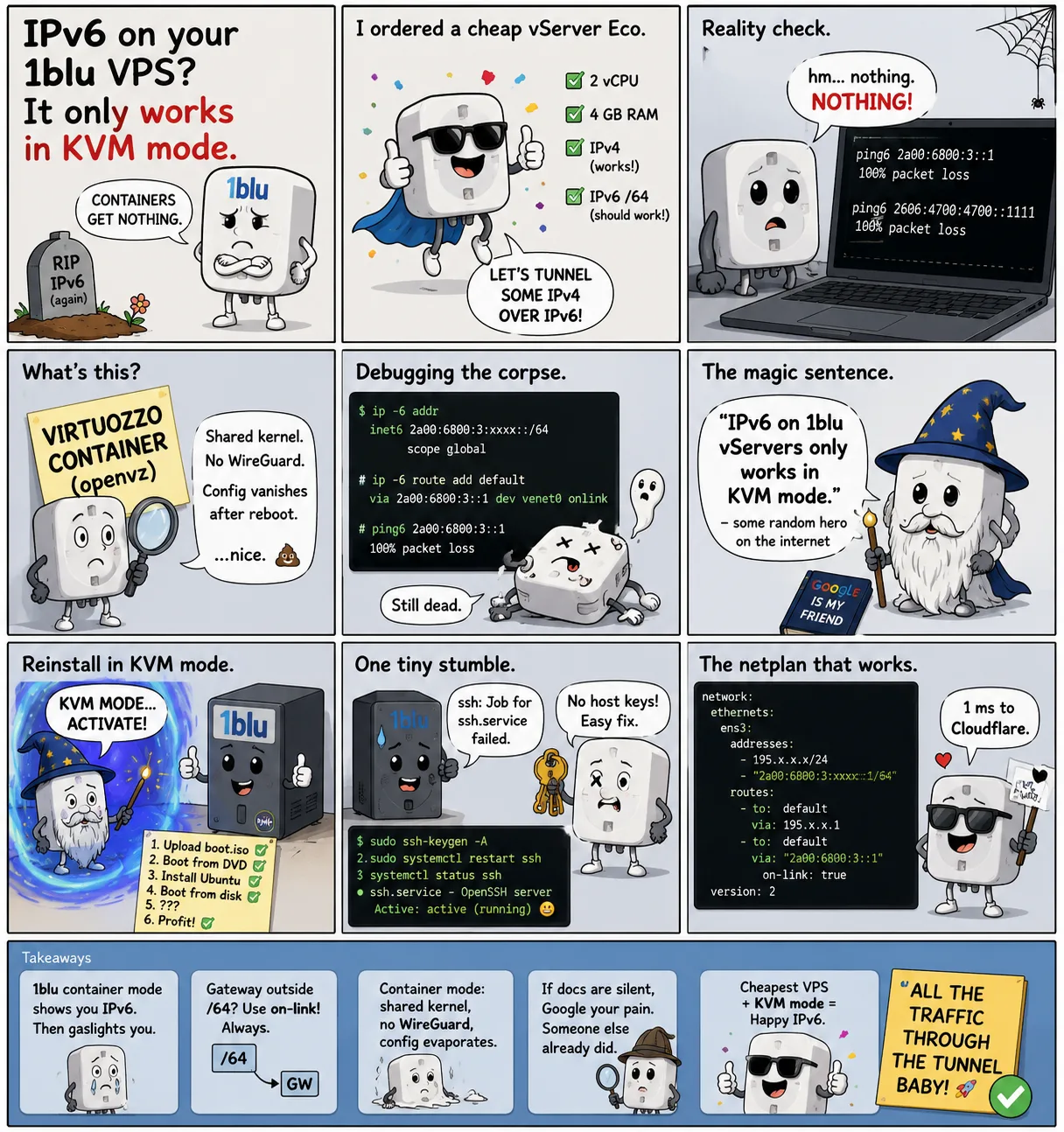
Google is my friend. So is some random hero on the internet.
1blu vServer product line (“1blu-vServer”), the entry-level VPS used here: https://www.1blu.de/vps/eco/ ↩︎
“1blu und IPv6”, trella.info. States that IPv6 on 1blu vServers requires KVM mode (not container virtualization) and documents the gateway and netplan route configuration: https://trella.info/administation/1blu-und-ipv6/ ↩︎ ↩︎